




WordPress plugins
Detector
Find out what plugins, page builder and theme any WordPress website is using, instantly, for free, no signup required.
- 100% free
- No signup
- Results in 2 seconds
Works on any WordPress site, we'll also tell you if a site isn't built with WordPress at all.
See exactly what you get
Every scan shows you:
- Every active plugin, with name, category and version
- Whether each plugin is free or premium
- The plugin author and a link to more info
- The site's WordPress theme, as a bonus
- The page builder in use, if any (Elementor, Divi, Beaver Builder, etc.)
- A full list of active plugins on the same site
How the WordPress plugin detector works
1: Paste the URL
Enter any website address into the scanner above, no account needed.
2: We analyze the site
WPoptic checks the site's scripts, stylesheets and asset paths against our database of WordPress plugin signatures.
3: Get instant results
See every active plugin, the theme and the page builder in about 2 seconds.
Want results without leaving the site you're browsing? Install the free WPoptic browser extension →
Why WPoptic finds more plugins than any other tool
We tested WPoptic against 13 other WordPress detection tools on websites where we controlled and verified every installed plugin ourselves.
WPoptic found more active plugins on average than any competing tool, with no false positives on 4 out of 5 test sites and an average scan time of about 2 seconds.
- Works as a free online scanner AND a browser extension
- Detects premium and free plugins, with category and price shown
- Also shows the site's theme and page builder in the same scan
- No signup, no scan limits, results in seconds
Plugin detector test
WPoptic had the best plugin detection results in this test. With an avarage speed of 2 seconds the results are the fastests.
Built for developers, designers and marketers
Developers & agencies
Quickly see a client's or competitor's plugin stack before starting a project or migration.
Marketers & SaaS teams
Find every website using a specific plugin or category of tool, useful for competitor research and lead generation.
Plugin developers
Track how your plugin (or a competitor's) is performing across the WordPress ecosystem.
Curious site owners
See exactly what someone else's WordPress site, is running.
Also want to know what theme a site is using?
Visit our WordPress Theme Detector →
Most popular WordPress plugins
In recent months, WPoptic has detected over 17,000 unique WordPress plugins a total of 68,134,209 times across 15,577,961 websites.
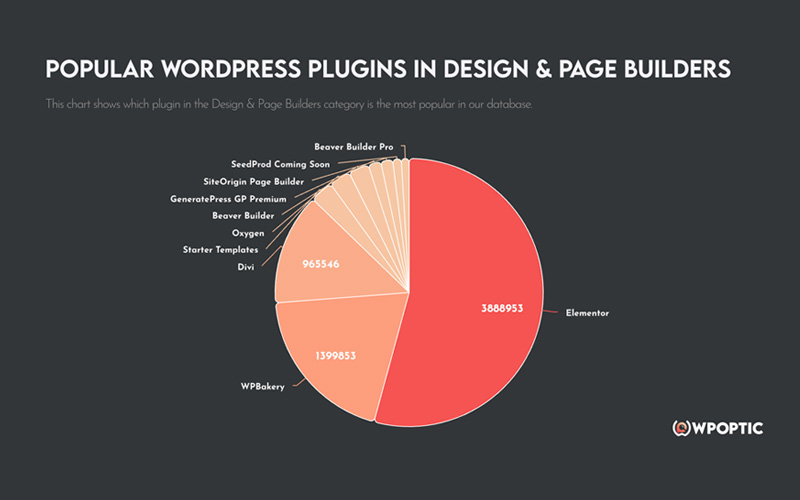
These are the most popular WordPress plugins in their category.
Free Browser extension
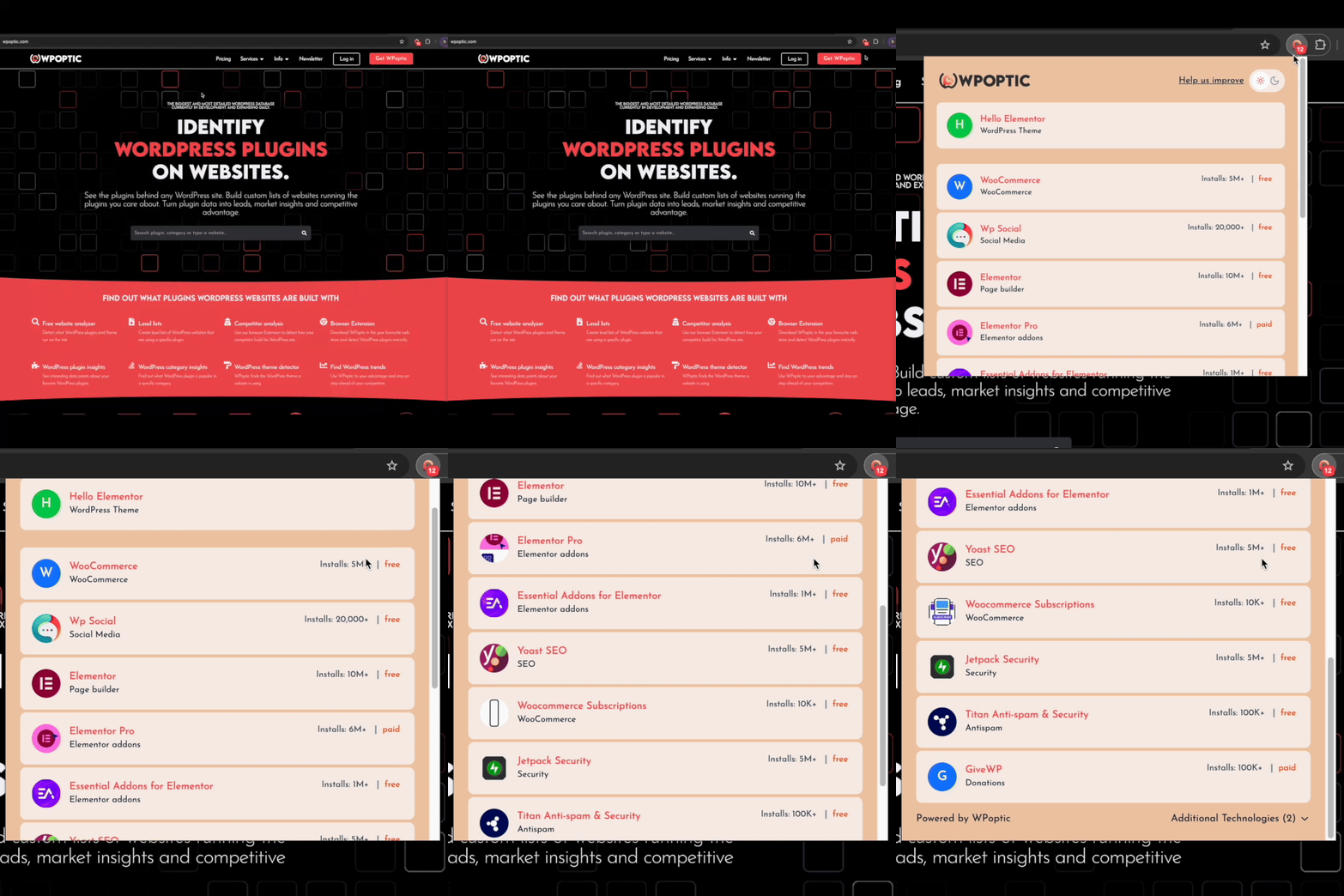
WPoptic is available direct in your browser
Download WPoptic for free from the Chrome, Edge or Brave extension webstore, showing results in seconds when checking a website. Information that is shown inside the browser extension are:
- Plugin name
- Plugin link
- Plugin category
- Plugin install count
- Plugin price
- Theme name
- Theme link
- Theme author
- Theme price
WordPress plugin insights
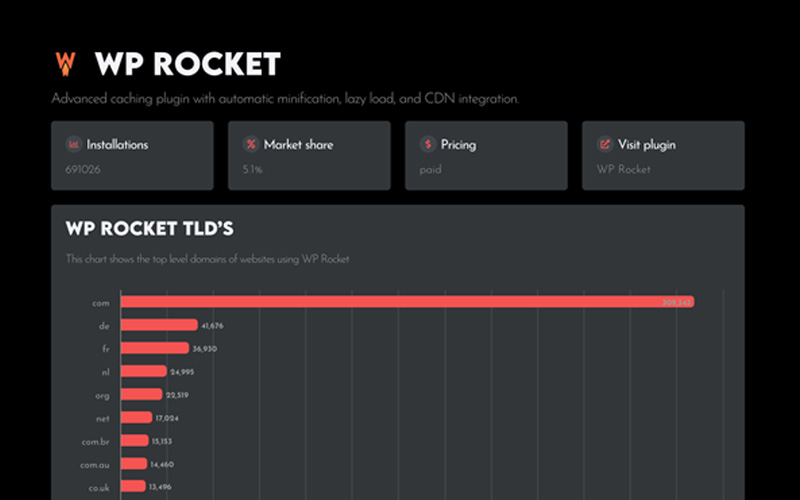
On our plugin pages we share unique insights we found in our database. Check out where a plugin is popular, what websites are using the WordPress plugin and much more.
WordPress category info
What WordPress plugin is the most popular in their category, what are other solutions and more information you will find on our WordPress category pages.
Top 100 WordPress Plugins
We created a top 100 WordPress plugins based on real installation count.
WPoptic has a lot of data about what WordPress plugins are used. We ran the numbers and created a top 100 of the most popular WordPress plugins
Check it out now.
Create WordPress leadlists
The data of WPoptic is accurate, secure and optimised for your purposes.
WPoptic ROI Calculator
Discount applied: 0%
Total lead list cost: € 0,00
Expected revenue: € 0,00
FAQ WordPress plugin Detection
WPoptic is a professional WordPress plugin detection tool that identifies plugins and themes used on any WordPress website. With a comprehensive database of over 30,000 plugin signatures, WPoptic delivers accurate detection results instantly and completely free of charge.
WPoptic scans the website’s HTML, script calls, style sheets, and unique plugin fingerprints. It checks these against our growing database of plugin signatures. The detector works instantly in your browser, so you don’t need to install anything on the target website. Or use the website scan on this website
Enter the site’s URL into the scanner above, or install the free WPoptic browser extension and click the icon while visiting the site. Both methods show every active plugin, its category and whether it’s free or premium.
Yes. The scanner on this page works entirely in your browser, paste a URL and get results in seconds, no extension or signup required.
Yes, completely free with no scan limits and no account needed. However, if you would like to lists of websites using a specific plugin. Then check out our lead lists
We track plugin names, versions, authors, URLs, premium markers, and usage frequency across all scanned sites. The data is extremely accurate because every detection is validated against our signature library. We continuously improve these signatures, so the accuracy grows automatically as more users scan websites.
In independent testing against 13 other WordPress detection tools, WPoptic found more active plugins on average than any competitor, with no false positives on 4 of 5 test sites.
Absolutely. WPoptic stores every detection in a central database. This allows you to generate lists like “websites using Rank Math,” “websites using Elementor,” or “sites running WooCommerce.” You can later filter, sort, or export these lists for prospecting, competitor research, or plugin analysis.
New detections flow into WPoptic every day through the Browser extension. We update plugin signatures, versions, and metadata continuously. This keeps the database fresh and ensures new or updated plugins get recognized quickly. Our database is updated each quarter.
Most of the time, yes. Even with aggressive caching, plugins still leave traces in the markup or assets. For headless WordPress or extremely custom builds, detection may be limited, but WPoptic still attempts to follow asset paths and script patterns that reveal hidden plugins.
Yes. WPoptic supports exporting in multiple formats so you can use the data in your CRM, spreadsheets, or presentations. Perfect for agencies doing audits, plugin developers researching markets, or freelancers creating reports for clients.
With the free Chrome extension, you can scan as many sites as you want. But our extension has a limiter so people don’t use it for bulk data extraction. If you need any type of WordPress list, please check out our lead-list function.
Yes. WPoptic aggregates detections from all scans to show you which plugins are rising in popularity. This makes it ideal for plugin developers, marketers, and agencies. You can spot trends early and adjust your strategy based on real usage data.
Yes, every scan returns the active theme and page builder alongside the full plugin list, in one result.
Trusted by WordPress Enthousiasts
These people love WPoptic,
test it for yourself and detect every WordPress plugin and theme on site.